Advertising On Google

  • Subscribe to our RSS feed.
  • Twitter
  • StumbleUpon
  • Reddit
  • Facebook
  • Digg

Thursday, 21 December 2006

Happy Holidays from the Inside AdWords crew

Posted on 22:18 by Unknown
This is our last post of the year, and before we enter hibernation we would like to wish all our readers a wonderful holiday and a happy new year. We'll be back in 2007, full of information, turkey, and candy canes. We'd like to share two festivities. First up, a song that's sure to become a holiday classic, The 12 Days of AdWords Christmas.

The 12 Days of AdWords Christmas (download the mp3)
On the twelfth day of Christmas, Inside AdWords gave to me:
12 Help Center Helpings
11 Seminar Updates
10 Beta Test Invites
9 Impressions Tippings
8 Checkout Reportings
7 Tips for Searching
6 System Updates
5 Haaaaaaaaaaand Turkeys
4 Tools for SMBs (Part 1 and Part 2)
3 Reporting Tips
2 Trademark Policies (Part 1 and Part 2)
And Advice to Improve Ads Quality!

Next, we continue our holiday tradition with our latest holiday doodle:


Posted by Trevor and Vivian, Inside AdWords crew
Read More
Posted in Fun, Seasonal | No comments

Wednesday, 20 December 2006

New multimedia guide about the Google content network

Posted on 15:44 by Unknown
Search advertising is very effective, but how are you reaching the millions of internet users who are online but not searching? To help you reach these folks, you might consider advertising on the Google content network. To help explain the benefits and features of the content network, we've created a brand new multimedia guide available here: https://trainingcenter.google.com/gcn.

The short but informative online guide will walk you through what advertising on the content network is all about. It’ll explain what makes advertising on the content network different from search advertising, how contextual advertising works and how you can use it to connect to customers through mass media sites, like major news sites, as well as smaller niche sites devoted to a specific topic, such as electronic gadgets. The guide will also tell you about the features and options available on the content network, such as site targeting, different ad formats, bidding features and performance tracking tools.

The Google content network guide is “hot off the presses” and doesn’t have a permanent home just yet; however, we wanted Inside AdWords readers to be amongst the first to see it. As always, we're happy to hear from you, so email us with any comments, questions, or suggestions!

Posted by Judy, Inside AdWords crew
Read More
Posted in | No comments

Friday, 15 December 2006

Save even more with Google Checkout

Posted on 14:22 by Unknown
Last month, the Google Checkout team announced that all Checkout sales will be processed for free until the end of 2006. What could be better than free processing? More free processing! Gavin C. from the Checkout team updates us with the latest details:

We have received such a positive response from merchants about free processing with Google Checkout that we decided to extend the offer through the end of 2007. Yep, from now through December 31, 2007, we'll process all your Google Checkout sales for free.

For those of you unfamiliar with the product, Google Checkout is a new checkout option that makes online shopping faster, more convenient and more secure. If you have an online store, customers who visit your site can use Checkout to buy from you using a single username and password. And once they do, you can use Google Checkout to charge their credit cards, process their orders, and deposit funds in your bank account. Google Checkout has many benefits, you can check out all the details here. ;-)

Posted by Feng, Inside AdWords crew
Read More
Posted in | No comments

AdWords Trademark Policy (Part 2 of 2)

Posted on 10:43 by Unknown
In part one of the AdWords Trademark Policy series, we reviewed the trademark complaint procedure and also answered some of the common questions asked by trademark owners. Today, we will answer the two most common questions asked by advertisers who would like to use trademarked terms in their ad text or keywords lists. Here they are:

My ad was disapproved per your trademark policy, but I should be able to use the trademarked term "Blue Widgets" in my ad because I actually sell the product Blue Widgets on my website. What gives?

We monitor the use of a trademark because the trademark owner has filed a complaint. For ads targeting the US and Canada, we will review ad text but not keywords. For ads targeting regions outside the US and Canada, we may review both your keyword list and ad text for trademarked terms per the trademark owner's complaint.


If you believe that you are authorized to use the trademark term in question, please contact the trademark owner directly to resolve your dispute. If the trademark owner approves your use of the trademark term, we will need to receive written confirmation directly from the trademark owner in order to authorize your use of the trademark.


I am an official dealer of Blue Widgets and the company said I could use the trademark in my ad text. Are you sure this isn’t a mistake?

As mentioned above, we will not allow the use of a trademark term according to the parameters of the trademark complaint filed by the trademark owner. Therefore, unless the trademark owner specifically grants you permission to use their trademarked term by contacting our Trademark team, we are not able to approve the use of the trademark in your AdWords ads. (Instructions on how a trademark owner can contact our Trademark team can be found in part one of this series.)


We hope this series has helped clarify our trademark policy as it applies to AdWords ads. Please keep in mind that this policy only applies to AdWords ads and not Google search results.

Posted by Judy, Inside AdWords crew
Read More
Posted in | No comments

Thursday, 14 December 2006

Ad Quality and Performance -- new in the Help Center

Posted on 15:05 by Unknown
Call it human nature. Lots of advertisers explore the Help Center extensively when they first start with AdWords, just to get a handle on the basics, but rarely make a return visit after that. But what about the helpful information that has added since that last visit, say, oh, six months ago?

Here's a good example: in the past few months a lot of new content concerning the key concept of Quality Score has been added to the Help Center.

In fact, if you were to visit today, you'd see a whole new section called Ad Quality and Performance. Within that section, there are four major subject areas, as noted below. Within each of those broad areas there are many detailed supporting topics. Here's an overview of what you'll find:

  • The Quality and Performance Overview section includes 11 topics meant to define quality and performance, and to help understand AdWords system behaviors.

  • Within the Quality and Performance Factors section, you'll find links to more than 25 topics on Quality Score, quality-based minimum bids, landing page quality, ad position, and clickthrough rate (CTR).

  • The Troubleshooting section offers more than 15 helpful links that can assist you in troubleshooting your keywords, ads, landing pages and minimum bids.

  • Lastly, the Improving Ad Performance section offers 20 or so topics on choosing successful keywords, creating targeted ads, and optimizing your account.
Yep, that's a lot of information. We hope you'll spend some quality time (pun intended!) in the Help Center one day soon -- and just explore. You'll almost certainly find some information you haven't seen before, which just might help you improve your advertising effectiveness.

Posted by Blake, Inside AdWords crew
Read More
Posted in | No comments

Wednesday, 13 December 2006

AdWords Trademark Policy (Part 1 of 2)

Posted on 10:37 by Unknown

Update (January 9, 2013): This blog post contains outdated content and does not reflect our current policies and procedures. The latest details about our regional trademark policies are in the AdWords Help Center. If you'd like to make a trademark complaint, visit our Help for Trademark Owners page.


Every now and again we receive questions regarding how trademarked terms are handled for AdWords ads. Most of the questions can be divided into two categories – questions asked by trademark owners and questions asked by advertisers trying to use a trademarked term in ad text or keyword lists.

In part one of this two part series, we will answer a few of the more common questions asked by trademark owners.

How do I prevent unauthorized advertisers from using my trademarked term(s) in their ad text and keywords?
Google AdWords has a trademark complaint procedure in place to help trademark owners monitor the use of their trademarked terms by AdWords advertisers. The trademark complaint procedure varies depending upon where the trademark owner has trademark rights. Please note the two procedures below:
  • Trademark rights in the US and/or Canada:
    Keywords – we do not investigate trademark terms as keywords
    Ad text – we are able to investigate the use of a trademark in ad text
  • Trademark rights outside the US and/or Canada:
    Keywords – we are able to investigate trademark terms as keywords
    Ad text – we are able to investigate the use of a trademark in ad text
Once a trademark complaint has been filed and approved by our Trademark team, ads and/or keywords containing the trademark in question may be disapproved depending upon the parameters of the complaint.

To file a complaint or to review more information, please use these links:
  • AdWords Trademark Complaint Procedure - Trademark rights in US & Canada
  • AdWords Trademark Complaint Procedure - Trademark rights outside US & Canada
  • Trademark complaint form
NOTE: You do not need to be an AdWords advertiser in order to submit a trademark complaint.

How do I add authorized users, or advertisers that I have approved to use my trademarked term in their ads, to my trademark complaint?
Towards the end of the trademark complaint form, you'll see a section where you can list the “Authorized Entities” you've approved to use your trademarked term(s). Fill in this section and the Trademark team will note these entities during the ad review process. If you do not specifically list authorized users (by either their AdWords Customer ID or their AdWords contact email address), authorized entities may be disapproved for using your trademark term(s).

If you've already filed a complaint and would like to add (or delete) an authorized user, please send either an email to ads-trademarks@google.com (if you are the original complainant only) or a signed letter on company stationary (address and fax information below) to the Trademark team. Please be sure to include the following information:

1. An explicit statement authorizing the authorized entity to use the trademarked term
2. The authorized entity's AdWords customer ID or login email address

Address and fax information:

Google Inc.
Attn: Google AdWords, Trademark Complaints
1600 Amphitheatre Parkway
Mountain View, CA 94043

Fax number: 650-649-1774
Attn: Google Trademark Complaints

This concludes part one of the AdWords Trademark Policy series. Stay tuned for part two, in which we'll answer common questions asked by advertisers trying to use a trademarked term in ad text or keyword lists.

Posted by Judy, Inside AdWords crew
Read More
Posted in | No comments

Tuesday, 12 December 2006

New lessons on AdWords Editor now available

Posted on 23:51 by Unknown
A quick update: we've recently updated the AdWords Learning Center with new multimedia lessons on the AdWords Editor. The detailed lessons will show you step-by-step how to use AdWords Editor's tools and features. Of course, if you prefer to print out these lessons on paper or view them without animation, they're also available in a text-only format.

Posted by Vivian, Inside AdWords crew
Read More
Posted in | No comments

Thursday, 7 December 2006

Google advertising on AdWords?

Posted on 18:24 by Unknown
Recently, we've noticed a few posts on other blogs commenting on the fact that Google advertises its own products or services using AdWords. We wanted to say a few words on the subject of why and how we do this, with an eye towards laying a few concerns to rest. Here's Walter H., from Google Marketing, to fill us in on the details:

Being rather proud of AdWords as a means to effectively advertise one's products or services, it seems natural to use it ourselves. Since it's a common practice across the industry for companies to promote their own products and services through their own web presence, there is much precedent to do this.

It's important to note, however, that our ads are created and managed under the exact same guidelines, principles, practices and algorithms as the ads of any other advertiser. Likewise, we use the very same tools and account interface.

As does any advertiser, we aim to give our campaigns a budget which is in line with their value to us in terms of the increased traffic we might see. We actively monitor and manage the success of our ads by adjusting ad copy, keywords, bids, and so forth in the same way any advertiser who is concerned with their account performance would.

That said, there are no special buttons to push or levers to pull that give our internal account managers special treatment or leverage. Quality Score is automatically evaluated in the same way for our keywords as it is for any advertiser's keywords. Likewise, the potential to show up in the top spots above the search results is the same for Google's ads as it is for any other. We rely on the AdWords system to let relevancy and usefulness to our users be the driving force behind our ad placement. As such, we do not intentionally try to secure a top position. In fact, we generally aim for a more 'conservative' position.

As was already mentioned, there are no algorithm changes to 'smooth the way' for Google's ads -- and the accounts of 'competing' advertisers (should there be any for particular keywords or Ad Groups) are never referenced in any way.

We're quite proud of the advertising platform we've built and it simply makes sense for us to use it. At the same time, the trust of both our users and our advertisers is of paramount importance. We honor that responsibility, and work hard to earn and keep that trust.

Posted by Blake, Inside AdWords crew
Read More
Posted in | No comments

Bringing radio advertising to Google advertisers: an update

Posted on 11:29 by Unknown
There's been a lot of speculation about what we're doing in radio advertising so we thought we'd give you a quick update regarding what we've been working on since the acquisition of dMarc Broadcasting earlier this year. Here's a note from Josh M., a member of the Google Audio Ads team:

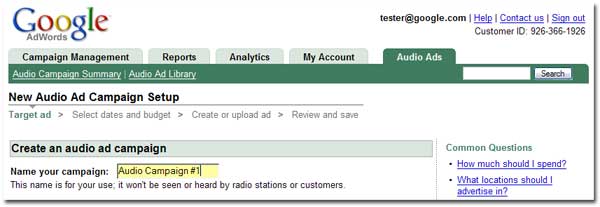
Over the last year, we've been working hard to integrate the dMarc advertising platform into Google AdWords. We're happy to announce that the integration is now complete and we've recently begun a U.S. beta test of Google Audio Ads with a small group of AdWords advertisers.


Google Audio Ads brings efficiency, accountability, and enhanced ROI to radio advertising by providing advertisers with an online interface for creating and launching radio campaigns. You'll be able to target your customers by location, station type, day of the week, and time of day. After the radio ads are run, you will be able to view online reports that tell you exactly when your ad played.

Over the last year, we've been partnering with both terrestrial and satellite radio stations across the U.S. so that our advertisers have many options for broadcasting their ads -- whether it's a Country station in Tyler, Texas or an Adult Contemporary station in New York City. Currently, there are hundreds of stations to choose from and we hope to grow the list over the coming year. Our broadcast partners are looking forward to making their ad inventories available to thousands of new advertisers, especially since they aren't easily accessible today.

As mentioned, the first beta test campaigns recently launched, and you may have already heard these advertisers' ads while driving to work or listening to the radio at home. The beta launch may leave you wondering when you will be able to use Google Audio Ads for your own radio campaigns? Well, while we haven't set a date yet for when the product will be more widely released, one thing is certain: Inside AdWords blog readers will be among the first to know.

Want more info? Check out some common questions about Google Audio Ads.

Posted by Sarah, Inside AdWords crew
Read More
Posted in | No comments

Wednesday, 6 December 2006

Advertise online - even if you don't have a website

Posted on 17:37 by Unknown
AdWords advertisers know that online advertising is an effective way to promote their businesses. What do you do, however, if you want to advertise online, but you don't have a website? Does this sound familiar? Now we can help.

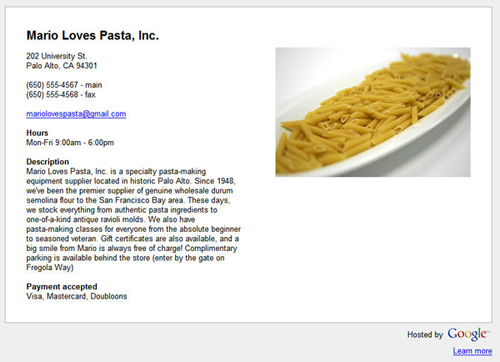
Hosted business pages, a new feature for AdWords Starter Edition, will let you do just that. A hosted business page is an informational webpage that new advertisers can create when they sign up for AdWords Starter Edition. You can use a hosted business page to tell people more about your business when they click on your ad. For example, if you own a restaurant, you might write about your award-winning cannoli; if you are a tailor, potential customers would be thrilled to read about your 48 hour turnaround on alterations.

Here's a sample of a hosted business page for a ficticious restaurant, Mario Loves Pasta, Inc.:


Hosted business pages are now available for new US advertisers using AdWords Starter Edition. It's important to note that a hosted business page is not a full-featured website with its own domain name, but rather a single landing page for your AdWords ads. Hosted business pages are free with a new AdWords account, and can be set up with no knowledge of HTML. You can learn more about hosted business pages in the AdWords Help Center.

If you're already an AdWords advertiser, perhaps you'd like to tell your favorite local restaurant owner that they can now advertise online, even if they don't have a website. Just watch out for the crowds of new customers.

Posted by Trevor, Inside AdWords crew
Read More
Posted in | No comments

Thursday, 30 November 2006

Answering your landing page quality questions (part 2)

Posted on 17:46 by Unknown
Recently, we answered some of your landing page quality questions here in the blog. Now, we'd like to answer a few more, focusing on landing page quality and the content network.

What is the content Quality Score?
The content Quality Score is a measure of the quality of your contextually-targeted ads and keywords and is specific to your ads that are showing on the content network. Since we use all of the keywords in an Ad Group (taken together, and defining a 'theme' for that Ad Group) in order to target ads to relevant pages in the network, the content Quality Score is only used to rank eligible ads on these pages. The information that is used to calculate your content Quality Score is different from that used for the search Quality Score and includes the relevance of your ad and keywords to the site on which your ads will appear, your ad's performance history on that site and similar sites, as well as the quality of the landing page to which your ad is linked.

Does your content Quality Score impact your search Quality Score?
Since this is especially important, we want to make sure that everyone sees the answer to this question, and that answer is 'No.'
Performance on the content network will not impact your search Quality Score, and vice versa.

Are you applying landing page quality to publisher sites in the content network?
No, this change is focused on improving the quality of ads (and their landing pages) that we serve across the content network. If an advertiser is not providing a high quality user experience on the page to which their ad links, then their ads may stop showing on sites in our content network.

Thanks for tuning in to the final post in our two part series on landing page quality. We hope we've answered most of your questions, but please let us know if there are others that you'd like us to address.

Posted by Sarah, Inside AdWords crew
Read More
Posted in | No comments

Wednesday, 22 November 2006

Our warmest Thanksgiving wishes

Posted on 12:49 by Unknown
Tomorrow is Thanksgiving -- a day to give thanks and rejoice with family and friends. Those of us on the Inside AdWords crew would like to offer our thanks to you, for your continued interest, readership, support, and feedback. And before we take the next few days off for our Thanksgiving holiday, we'd like to share with you our latest holiday doodle -- a little something that's become somewhat of a tradition on the blog. :-)

We wish you a safe and wonderful Thanksgiving.

Posted by Vivian, Inside AdWords crew
Read More
Posted in | No comments

Monday, 20 November 2006

New Features in Ads Diagnostic Tool

Posted on 17:59 by Unknown
We know that one of the most common problems you face when managing your AdWords account is trying to figure out why your ad isn't showing for a particular keyword. If that sounds familiar, you'll be glad to hear that we've released a new feature that provides one-click troubleshooting for this problem. Here's an update on the feature from Peter H. on the Ads Diagnostic Tool team:

We're making the Ads Diagnostic Tool more accessible by incorporating it into the Ad Group details page. You can access this new feature via the new magnifying glass icon next to each keyword. If you are concerned that an ad is under-performing because of a particular keyword, you can point your cursor at the magnifying glass to get an instant diagnosis for that keyword. If the Ads Diagnostic Tool finds an issue that may be related to that keyword, you can receive troubleshooting suggestions by clicking the "What can I do now" link that appears inside the help bubble. If there are no issues with your keyword, the bubble will tell you that your ad is running normally on Google.com.

We've also added some very useful features to the full Ads Diagnostic Tool on the Tools page. Now you can request diagnostics for ads running in a specific geographic location. Another new feature in the Ads Diagnostic Tool is a direct link to the ad preview page for specific keywords. By clicking on "Preview search results" link for each keyword, you can now view what your ad looks like and where it's showing up on the search results page without creating an impression.

We hope that these improvements will make it easier for you to diagnose and resolve keyword performance issues!

Posted by Feng, Inside AdWords crew
Read More
Posted in | No comments

Friday, 17 November 2006

Ready for Black Friday and Cyber Monday?

Posted on 15:37 by Unknown
The day after Thanksgiving is traditionally known as "Black Friday" – the busiest shopping day of the year, and what many retailers consider the official start of the holiday season. While you're busy marking down your products in preparation for the in-store sales, don't forget to think about your online customers, too—especially since "Cyber Monday" is just a few days after Black Friday.

Now would be a good time to take a look at your AdWords campaigns, and perhaps even create new Ad Groups that have keywords and ad text related to your promotional items. Be sure to use a Destination URL that takes shoppers directly to the most appropriate product page so that they can easily find your discounted products. These small adjustments to your AdWords campaigns can make quite a difference in helping you attract even more online bargain hunters to your site.

Oh, and did we mention that there are only 38 more days until Christmas? :-)

Posted by Vivian, Inside AdWords crew
Read More
Posted in | No comments

Thursday, 16 November 2006

Answering your landing page quality questions (part 1)

Posted on 07:38 by Unknown
On November 6, we let you know that we would soon be making changes to the way that AdWords evaluates landing page quality. These changes are now live and we'd like to follow up with a two part series to answer some of the questions that we have received.

Why did you make this change right before the holiday season?
As more and more holiday shoppers turn online to find gifts, we want to do everything we can to serve the most relevant and highest quality ads to our users. By making improvements to landing page quality, we're not only able to help users (who are your potential customers) find what they want, but also help you maximize your leads because your ads will no longer have to compete with ads that are providing a poor user experience.

To give a bit more background, we had an internal debate about when to release these changes. We ultimately decided that since our focus is providing the most relevant advertising, it was best to launch these long-planned improvements as soon as we were ready to go, technically speaking.

Can a page that has a high CTR or conversion rate be considered a poor quality landing page?
In short, yes. Though the Quality Score incorporates the CTR of your keyword, when our system is specifically evaluating your landing page quality, it does not consider the CTR of your keywords or any conversion tracking or Google Analytics data in the account. Instead, it's focused on the actual content and relevance of your landing page to a user who clicks on your ad and ends up on your site. It is well worth noting that not all ads with a high CTR provide a good experience for users. For example, an ad may promote a new home for sale in San Francisco for the query 'San Francisco homes', but after clicking on the ad, the user is taken to a page that shows houses in Seattle. This is not a particularly good experience for the user -- but the ad itself could still be highly relevant to the keyword, and thus is likely to have a high CTR.

Will using Website Optimizer improve my landing page quality?
Using Website Optimizer to experiment with your landing page does not have any impact on your Quality Score or your landing page quality. Website Optimizer evaluates your conversion rates to tell you which marketing messages are converting most often on your landing page, whereas the Quality Score doesn't incorporate any conversion information. Please remember that once you've made a change to your landing page based on tests run with Website Optimizer, the Quality Score may change as with any other changes to your landing page.

We hope this helps to clear up some of your questions about this recent change. If you have additional questions, please let us know and we'll answer as many as possible the next time we write about landing page quality.

Posted by Sarah, Inside AdWords crew
Read More
Posted in | No comments

Monday, 13 November 2006

Tips on seeking AdWords technical help

Posted on 18:06 by Unknown
From time to time our technical support team receives reports of issues with the AdWords system. While they work hard to try to resolve these technical issues as quickly as possible, they're sometimes slowed down because they haven't received enough information to diagnose the problem immediately. Today, Stephen H. from the technical support team offers some advice on the most important information to include when reporting a technical problem:

1. The complete address of the web page where the issue occurred.

2. What you were doing when the problem occurred. We like as much detail as possible, so you might make a list of the steps you took. For example, 'First, I logged into my AdWords account. Second, I clicked on the link for Campaign #2. Third, I got an error message.'

3. The complete text of any error messages. It is very helpful for us to know the exact error message you saw.

4. Information about your computer's operating system. Knowing whether you use Windows PC or a Mac can help us better identify the problem.

5. Information about your web browser. Is it Firefox, Internet Explorer, or another browser? What version? In most browsers, you can usually find the version number by selecting 'About' under the Help menu.


Including the above information in your technical help request will help the support team identify and resolve your issue more quickly. So, if you find yourself scratching your head over a technical problem, heed Stephen's expert advice so that he and the rest of his team can provide you with a thorough and quick fix.

Posted by Feng, Inside AdWords crew
Read More
Posted in | No comments

Thursday, 9 November 2006

Google tools for SMBs (Part 2 of 2)

Posted on 10:28 by Unknown
Last week, we highlighted a few Google tools that we thought could help address some of the communication needs of small to medium sized businesses (SMBs). In the second half of this series, we'll take a look at tools geared at enhancing your website - Google Checkout, webmaster tools, and the Google Mini.

GOOGLE CHECKOUT
For those who didn't see our post a few months back, Google Checkout™ is a checkout process for your website that enables your customers to buy from you quickly and securely, using a single username and password. Once customers make a purchase, you can use Checkout to charge their credit cards, process their orders, and receive payment in your bank account.

Here are some additional ways that Checkout can be of value to you:
  • The Checkout badge on your AdWords ad can help attract more leads by increasing your visibility with potential buyers who are familiar with the Checkout process.
  • Checkout offers a fast and secure purchasing process, which helps customers feel comfortable doing business with you.
  • For every $1 you spend on Google AdWords, you can process $10 in sales for free.
  • Checkout’s fraud prevention tools stop invalid orders from reaching you and the Payment Guarantee policy helps protect you from chargebacks.
We also just learned that Checkout will be processing all transactions for free for a limited time. You can find more information about this offer here.

For more information on Checkout or to sign up, please visit the Google Checkout™ website.

GOOGLE WEBMASTER TOOLS
Google’s free webmaster tools offer you, or your webmaster, an easy way to make your site more Google-friendly. Webmaster tools help you see Google’s view of your site, diagnose problems, and share information with Google in order to improve your site’s visibility in Google’s search results.

Webmaster tools can assist you in answering questions such as:
  • How can I let Google know about all the pages on my site?
  • What search queries bring my site the most traffic?
  • Why is my site being returned for particular keywords?
  • What page does Google see as the most important one on my site?
  • How can I make sure that private information on my site stays private and Google doesn't index it?
If the answers to any of these questions are of interest to you, please visit the webmaster tools website for more information. You can also direct your questions to owners and webmasters who use webmaster tools today in the Google Webmaster Help group.

GOOGLE MINI
In order for a customer to purchase a product, they first have to find it on your website. According to Jupiter Research, 85% of website searches don’t return what the user was looking for and research firm IDC reports that 80% of visitors abandon a website if search functionality is poor. The Google Mini, a hardware and software appliance, makes searching your website as easy as searching for information on Google.com.

The Google Mini can power website search over multiple websites and delivers search results that seamlessly integrate with your website's design. In contrast to the statistics above, AdWords customer Toolfetch.com implemented the Google Mini search appliance and saw a 30% increase in searches on their website and a 15% increase in sales within the first month.

If you think the Google Mini might be right for you and your website, you can find more information here.

We've come to the end of our two part series on Google tools for SMBs. We hope that you found a tool or two that can help address some of your day-to-day business needs. Remember, you can always find information on these tools, as well as a few others we didn't get a chance to tell you about, by visiting the Google Business Solutions page.

Posted by Judy, Inside AdWords crew
Read More
Posted in | No comments

Please plan ahead...

Posted on 09:07 by Unknown
This just in, straight from our tech team:

On Saturday, November 11th, the AdWords system will be unavailable from approximately 10 a.m. to 2 p.m. PST due to system maintenance. While you won't be able to log into your account during this time, your campaigns will continue to run as usual. We apologize for any inconvenience.

Posted by Sarah, Inside AdWords crew
Read More
Posted in | No comments

Tuesday, 7 November 2006

Ad Preview column for Ad Performance reports

Posted on 09:32 by Unknown
With so many ad variations available in AdWords today, it's easy to lose track of which ads or types of ads you're running in your campaigns. To help keep things straight, the Report Center team recently introduced a cool new feature called the Ad Preview column. The Ad Preview column is viewable in the HTML version of Ad Performance reports and shows your text, image, video, mobile, or local business ad alongside the ad’s performance statistics.

To include the Ad Preview column in your Ad Performance report, simply check the ‘Ad Preview’ box under the Attributes section in Advanced Settings: Add or Remove Columns on the Create Report page.

Posted by Judy, Inside AdWords crew
Read More
Posted in | No comments

Monday, 6 November 2006

Landing page quality update

Posted on 11:48 by Unknown
In early July, we sat down with Andrew C., product marketing manager for Ads Quality initiatives. At that time, Andrew spoke of our continuing efforts to improve the quality of our users' experience when they visit an advertiser's landing pages. Today he returns with a heads-up regarding an upcoming development:

In the next few days, we will be making two changes to how AdWords evaluates landing page quality. First, we'll begin incorporating landing page quality into the Quality Score for your contextually-targeted ads, using the same evaluation process as we do for ads showing on Google.com and the search network. Advertisers who may be providing a poor experience on their site will notice that their traffic across the content network decreases as a result of this change. Second, we're improving our algorithm for evaluating landing page quality and incorporating landing page content retrieved by the AdWords system.

As with our July system update, both of these changes will affect a very small portion of advertisers, so the vast majority of advertisers will not be affected at all by either change. However, those who may be providing a low quality user experience will see an increase in their minimum bids for Google.com and the search network and/or a decrease in traffic across the content network. In most cases, we expect that the higher minimum bids will cause the low quality ads and keywords to become "inactive for search." Since July, we've received quite a few questions from advertisers about our landing page quality initiatives, and I'd like to address the most common ones today:

Why are you focusing on landing page quality?
The goal of our ongoing landing page quality initiative is to improve the experience of our users by providing high quality results not only in the ad text, but also once the user has clicked through to the site. We strongly believe that an excellent experience on the advertiser's site is an essential element in earning the continued trust of our users. Clearly, the better the user experience, the more likely it is that users (who are also your potential customers) will continue to seek out -- and click on -- AdWords ads over the long term. This is to the advantage of everyone: users, advertisers, and Google alike.

What do you consider to be a high quality landing page?
While we suggest landing page and site guidelines, we don't provide more specific recommendations because there's no one-size-fits-all approach to best create landing pages. We therefore encourage you to focus on building landing pages that are best for your users, whether they come from AdWords or other sources. In doing this, it may be instructive to put yourself in your customer's shoes and closely examine what it is that leads you to explore and do business with a site rather than simply click the "Back" button.

Will my landing page quality affect my ad's position?
Not for Google search. While one's landing page quality is directly correlated with the minimum bid required for one's ads to run, it does not affect your ads position (or 'rank', as it is often referred to) at all. However, since there is no minimum bid requirement for contextually-targeted ads, low quality landing pages will result in the need to bid higher to compete in the auction, which could also impact your position on pages in the network.

Update:
Clarified that the term 'search' in the second paragraph means 'ads showing on Google.com and the search network.'

Posted by Sarah, Inside AdWords crew
Read More
Posted in | No comments

Friday, 3 November 2006

Google tools for SMBs (Part 1 of 2)

Posted on 18:54 by Unknown
Generally, we like to stick to our guns and focus on topics related to AdWords; however, we know that many of you are owners or managers of small to medium sized businesses (SMBs) that use AdWords as just part of a suite of business solution products. In a two part series, we’d like to highlight a few non-AdWords Google tools that may help address some of your everyday SMB needs.

Today, we'll highlight Blogger, Google Apps for Your Domain, and Google Docs & Spreadsheets - free communication tools that can be used for internal or external purposes. Learn more below:

BLOGGER
Blogger is a web-based tool that helps you publish to the web instantly. Because it's quick and easy to use, it's the perfect tool for connecting an SMB with customers. For example, you may want to create a customer feedback blog, or, as we do here on the Inside AdWords blog, post updates about changes or enhancements to your business.

Here are some of the other reasons for using Blogger for your business:
  • Set-up is fast and free
  • Blogger's customizeable design templates do not require HTML knowledge
  • Comments are a great way to generate customer feedback and multiple authors can contribute to one blog
  • It's easy to include AdSense to monetize
If Blogger sounds right for you, you can quickly create an account today by going to the blogger website.

GOOGLE APPS FOR YOUR DOMAIN
Google Apps for Your Domain enables employees to communicate, collaborate and work more effectively together. You can use any combination of Gmail, Google Talk and Google Calendar with your own user accounts (like chris@your-company.com). Plus, create and publish web pages to your Google domain with Google Page Creator. It's free, and it's all hosted by Google -- no hardware or software required.

To learn more about Google Apps for Your Domain, please visit http://www.google.com/a.

GOOGLE DOCS & SPREADSHEETS
Google Docs & Spreadsheets is our new, free web-based word processing and spreadsheet program that can help you manage company documents and easily share them with others.

For example, you might use Docs & Spreadsheets to collaborate in real time and share information about your online ad activities, draft proposals and budgets, and keep track of your Google Analytics tags all in one place. Many of the entries on this blog wouldn't have turned out quite so well without team collaboration made possible by Docs & Spreadsheets.

With Google Docs & Spreadsheets you can:
  • access your files from any computer via a web browser
  • easily send them to collaborators to review and edit
  • view all past document revisions and revert back to a previous version if necessary
  • easily distribute content by pointing your colleagues or customers directly to a file from your website
Google Docs & Spreadsheets is free, secure, and requires no downloading. Check out the product tour for an overview of how the product works, or sign up today.

Stayed tuned for part 2 of our Google tools for SMBs series, in which we'll discuss tools to enhance your website. In the meantime, to learn more about Google business solutions, visit http://www.google.com/services/.

Update: Blogger links corrected.

Posted by Judy, Inside AdWords crew
Read More
Posted in | No comments

Tuesday, 31 October 2006

Trick-or-treat with AdWords

Posted on 13:24 by Unknown
Whether you're walking door-to-door with a small ghost in tow or handing out treats tonight, you're sure to hear the phrase "Trick-or-Treat" screamed more than once by excited youngsters. As that phrase lingers in your head for the next couple of days, here's a way that you can constructively apply it to your AdWords campaigns to improve the experience of your potential customers and your bottom line.

Every advertiser has an end goal in mind when they decide to advertise online. You may want people to sign-up for your fall pumpkin recipe newsletter, or perhaps you're trying to increase sales of holiday decorations. But, are you doing an effective job of telling your potential customers what you have to offer?

If you're trying to "trick" people by using keywords and ad text that don't speak to what you actually have to offer, you may find that users click on your ad, but don't do much else. Instead, try providing both your users and yourself with a "treat" by using relevant keywords and writing ad text that is specific to the product or service that you'd like to promote. For example, if you're trying to drive free holiday newsletter sign-ups through your AdWords ads, make sure you mention this in your ad text and then ensure that the sign-up form is both easy to find on your landing page and simple to use.

Not only does this provide a better experience for your potential customers, but it will also help you get more out of your advertising dollars by targeting users who are actively searching for exactly what you have to offer.

With that, enjoy an evening full of haunted houses and two-toothed pumpkins. Happy Halloween from the Inside AdWords crew!

Posted by Sarah, Inside AdWords crew
Read More
Posted in | No comments

Monday, 30 October 2006

Where are my stats?

Posted on 10:35 by Unknown
Here's a quick question (and answer) that we spotted on the AdWords Help user-to-user support forum. We thought it'd be worth posting here (lightly paraphrased for clarity) to more fully explain one important aspect of monitoring your account performance.

When will I see activity? My ads have been live for hours now.

To which, a short while later, a helpful community member replied:

Give it a bit more time. While your ads can go-live and be displayed within a short time of their creation, the stats are updated on a larger interval.

Yep, this is a good observation. When new or edited ads are submitted to the AdWords system, there will typically be a short delay before their appearance on Google.com, during which many servers must be updated. This delay can be of variable length depending on volume of activity on the AdWords site, but in most cases is considerably less than an hour.

Once your ads start appearing, it's important to know that their statistics are not reported in real-time. Instead, stats are typically delayed for up to three hours during which time they are aggregated from various servers, sorted and organized, filtered for invalid activity, and so forth. You'll see this delay mentioned in your account: if you look just below the chart in which your stats appear (at either the campaign or Ad Group level) you'll see some smallish type that looks about like this:

Reporting is not real-time. Clicks and impressions received in the last 3 hours may not be included here. There is a 24 hour delay in conversion tracking reporting...

While we're on the subject of statistics, here's another interesting fact worth knowing: clicks and impressions are not necessarily updated on the same schedule. So, for example, clicks can be updated in your account more quickly than impressions. In light of this, it's possible that the number of clicks shown in your stats could exceed the number of impressions until the statistics are completely updated - which typically occurs by the end of the day.

Posted by Blake, Inside AdWords crew
Read More
Posted in | No comments

Friday, 27 October 2006

Additional AdWords Seminar dates added

Posted on 11:20 by Unknown
Not too long ago, we posted about a new series of AdWords Seminars being offered by search marketing professionals who are also Qualified Invididuals in the Google Advertising Professionals program. Due to the overwhelming response, we've worked with the seminar leaders to add four more sessions of AdWords Seminars in November 2006. If you are living in, or will be visiting the Los Angeles, San Francisco, New Jersey / New York City, or Dallas area, be sure to check them out.

You'll find more information about these seminars, including dates, course outlines, and registration instructions at http://www.google.com/awseminars. And of course, if you'd like to be informed when AdWords Seminars become available in your area, simply fill out this form.

Posted by Vivian, Inside AdWords crew
Read More
Posted in | No comments

Tuesday, 24 October 2006

Searching the Inside AdWords blog

Posted on 12:29 by Unknown
The Inside AdWords blog has been running for 17 months, 8 days and 4 hours (give or take) and now includes over 200 posts. That's a lot of information detailing how you can use AdWords more effectively. If you haven't been following the blog the whole time, or if you want to get back to something you missed, you can use our search function to find information on just about any topic we've covered.

Take a look at the upper right corner of the blog. Just below the Google logo you'll see the search box, labeled "Search Inside AdWords", where you can type your query. Here's one query you can try: ad not showing. This will bring up all of the posts on this topic.

Since our search box is powered by Google, you'll see your search results on a page that looks like any regular Google search. Similarly, you can use all the handy tricks that you already use with Google search to find exactly what you want. Below are two of the more helpful search operators for searching the Inside AdWords blog, as mentioned in the very useful Essentials of Google Search -- specifically Phrases and Negative Terms.

Phrases - Putting your search terms in quotation marks will search for posts that contain those terms in that order. For example, if you only wanted results about the Google network, then you should enclose your search term in quotes, "Google network". (Please note that while we've capitalized Google in this example, the search itself is not case-sensitive -- so a search on "google network" would give you the same result.)

Negative Terms - You can take out words that you're not looking for using the negative operator (the "-" sign). If you search for report center -analytics, for example, you'll only find posts on The Report Center that do not mention analytics in your search results.

For more tips on using Google search, check out this printable cheat sheet. And, if by any chance you do a search for a topic that's important to you and get no results at all, please let us know. You may have just discovered the next post we should be writing! Happy searching!

Posted by Trevor, Inside AdWords crew
Read More
Posted in | No comments

Friday, 20 October 2006

New AdWords tools and enhancements

Posted on 15:50 by Unknown
Recently, we've released a few small features that we think you'll find helpful. Read on for a quick overview.

'Last thirty days' date range for reports
In addition to viewing data from the last month, you can now view performance data for the last thirty days. This date range is a new selection in the settings section of the create report page.

Graphs for weekly and hourly reports
Graphs are now available for weekly and hourly reports. To view the graphs, click 'View graphs only' or 'View data and graphs' from the View Report page.

Ad format filters for the site tool

The site tool now features ad format filters, an enhancement allowing you to choose sites that accept specific ad formats for site-targeted campaigns. You can now search for sites by ad types (text ads, image ads, or video ads) and various size formats.

Feel free to give these new features a quick spin this weekend, and let us know if you have any feedback.

Posted by Feng, Inside AdWords crew
Read More
Posted in | No comments

Wednesday, 18 October 2006

Beta testers needed for new Website Optimizer

Posted on 08:01 by Unknown
Looking to increase the number of conversions you're getting on your site? If so, you'll likely be interested to hear what Ann-Lee, from the Website Optimizer team, has to say about a new tool:

As an advertiser you spend both time and money driving traffic to your website, but if your site doesn't engage your audience then it's likely that you aren't converting those visitors into customers. We know that this can be difficult to test and we want to help you out.

Over the coming weeks we'll be testing a new tool called the Website Optimizer that can help you find out which content will convert best on your site. Whether you define a conversion as a purchase or a newsletter sign-up, Website Optimizer allows you to experiment with different headlines, copy, and images on your site in order to find out which combination results in the most conversions. You can use this tool on your landing page or any page that represents a conversion.

At the end of each experiment, graphical reports show which version of your landing page users liked best, as measured by which variation had the highest conversion rate. So, if you're interested in increasing conversions, we think you'll find the Website Optimizer useful.

Using Website Optimizer to experiment with your landing page does not have any impact on your Quality Score, so long as you maintain the existing default landing page for the Ad Group. Once you make a change to your site based on the results, however, the Quality Score might change as with any other changes to your landing page. That said, if a change is good for your users, it is probably good for your Quality Score too.

For this beta, we'll only be able to invite a small number of advertisers to participate, selected from all that apply. Selection will be based on a number of factors, including amount of traffic the landing page receives and the ability to begin testing quickly. We'll contact those selected on a rolling basis over the coming weeks. In the near future, we look forward to releasing this tool to all advertisers.

Learn more about why landing page optimization is important here. Then, find out how Website Optimizer can help you improve your ROI and apply for our beta test.

Posted by Sarah, Inside AdWords crew
Read More
Posted in | No comments

Tuesday, 17 October 2006

AdWords Maintenance on October 17

Posted on 09:17 by Unknown
This just in, straight from our tech team:

We will be performing additional AdWords maintenance from 3 p.m. to 6 p.m. PDT on Tuesday, October 17, 2006. While all AdWords advertisements will continue to run as normal, you may not be able to retrieve reports or upload image ads during this time.

We apologize for any inconvenience this may cause.

Posted by Sarah, Inside AdWords crew
Read More
Posted in | No comments

Sunday, 15 October 2006

AdWords Maintenance on October 16

Posted on 17:39 by Unknown
This just in, straight from our tech team:

We will be performing AdWords maintenance from 3 p.m. to 6 p.m. PDT on Monday, October 16, 2006. While all AdWords advertisements will continue to run as normal, you may not be able to retrieve reports or upload image ads during this time.

We apologize for any inconvenience this may cause.

Posted by Sarah, Inside AdWords crew
Read More
Posted in | No comments

Friday, 13 October 2006

AdWords Editor Version 2.0

Posted on 09:08 by Unknown
Earlier this year, we told you about AdWords Editor – a free, downloadable campaign management application. With AdWords Editor you can quickly and easily navigate your account, copy and paste keywords and ad text, share proposed changes with others, work offline and upload changes later, and, most importantly, make large-scale changes using a wide variety of search and editing tools.

Until recently, AdWords Editor was available on an invitation-only basis, but is now available to everyone. Even more exciting, we just released Version 2.0 which includes new features such as:

Replace text
Have you ever made the same change to multiple ads within your account (e.g. changing the price of an item that you just placed on sale)? The replace text feature makes it easy to find and replace text from a headline, description line, or URL in one step.

Find duplicate keywords
Unnecessary duplicate keywords can complicate your account management and skew performance statistics. Search your account for multiple instances of the same keyword, then edit or delete the duplicates as needed.

Advanced Maximum CPC changes
As your keyword lists grow, you may find yourself spending a lot of time editing Max CPC bids. The Advanced Maximum CPC changes tool helps you adjust bids by a specified percent or dollar amount, raise bids to the minimum CPC for all your inactive keywords, and more.

Keyword Grouper
Want to know one of the most important tips for success with AdWords? Create tightly knit Ad Groups with keywords and ad text that are based on a common theme. To help you do just that, AdWords Editor offers the Keyword Grouper. The Keyword Grouper takes an existing list of keywords and divides them into smaller Ad Groups based on common themes. You can then create related ad text for the new Ad Groups or have the choice of using existing ad text from within your account.

These are just some of the cool new features for Version 2.0. For a full list of features, check out the AdWords Editor release notes. If you haven’t downloaded AdWords Editor, you can do so by visiting the AdWords Editor website. If you’re already using AdWords Editor, you’ll have the option to update to Version 2.0 the next time you open the application.

Posted by Judy, Inside AdWords crew
Read More
Posted in | No comments

Thursday, 12 October 2006

Please plan ahead...

Posted on 12:30 by Unknown
This just in, straight from our tech team:

On Saturday, October 14th, the AdWords system will be unavailable from approximately 10 a.m. to 2 p.m. PDT due to system maintenance. While you won't be able to log into your accounts during this time, your campaigns will continue to run as usual. We apologize for any inconvenience.

Posted by Sarah, Inside AdWords crew
Read More
Posted in | No comments

Wednesday, 11 October 2006

Site in search results = no ad impressions?

Posted on 18:23 by Unknown
Here's another question (slightly edited for clarity and length) from the AdWords Help community. We've seen this question often enough that we thought it'd be worthwhile to answer it right here in our blog:

Hi there, I have been trying google adwords now for about 2 weeks. One thing is perplexing me more than all the others. You place an ad, and a user types in your keyword - now if the company you are advertising comes up on the first page in the main listings (the ones on the left) does that mean that google won't show your ad? I have one company here where I cannot get any impressions, and I am thinking that this is the reason. Can anyone enlighten me on this please...?

We're happy to oblige. The short answer is: no, having the advertised company appear in the unpaid search results for a keyword will not prevent your ad from showing for that keyword.

Here are some additional details, which also answer a number of related questions we've heard over the years:
  • Inclusion in the search results has no impact on whether or not one's ads will appear
  • Being an advertiser has no impact on whether or not one's site appears in the search results
  • Being an advertiser and then closing the account has no impact on one's site appearing in the search results
  • Being an advertiser with a very large budget does not help (nor hurt) one's chances of appearing in the search results
  • Being an advertiser with a tiny budget does not hurt (nor help) one's chances of appearing in the search results
To sum it up, Google's advertising programs are entirely independent of the unpaid search results - and one does not affect the other in any way.

Lastly, to help troubleshoot why you're ads are really not receiving impressions, check out this handy checklist from the AdWords Help Center.

Posted by Blake, Inside AdWords crew
Read More
Posted in | No comments

Tuesday, 10 October 2006

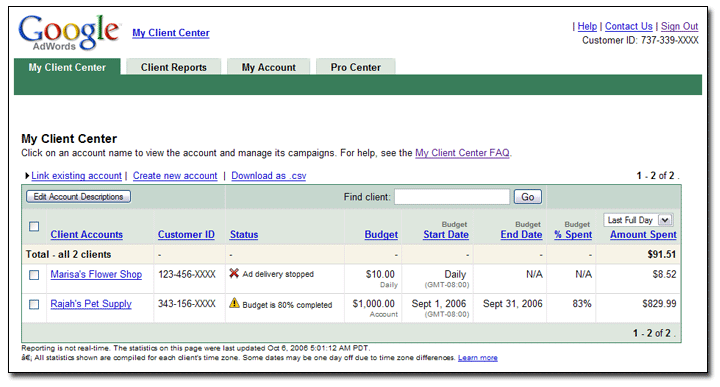
Managing multiple client accounts?

Posted on 12:40 by Unknown
If you manage AdWords accounts on behalf of clients, you might consider using a My Client Center (MCC) - a helpful tool that allows you to access all the AdWords accounts that you manage under one easy login. As you can see from the image below, an MCC provides an easy-to-read dashboard with relevant information such as customer IDs, high level budget overviews, and spend information for your linked accounts. To access a specific account, simply click on the client account name to be taken to the Campaign Summary page for that account.


As an added bonus, the MCC offers specialized alerts which help identify any issues that are currently affecting your linked client accounts. For example, you may want to be alerted if one of your client accounts is currently offline because the credit card for that account was declined. Other MCC alerts can notify you of interruptions in ad delivery and approaching campaign and account budget end dates.

MCCs are offered through the Google Advertising Professionals program, but you do not need to become a Qualified Google Advertising Individual or Company to create and use an MCC.

Posted by Judy, Inside AdWords crew
Read More
Posted in | No comments

Thursday, 5 October 2006

Pitfalls to avoid...

Posted on 22:43 by Unknown
We thought it might be a useful to tackle some of the pitfalls that advertisers sometimes encounter, in order to steer other advertisers away from these situations in their own accounts.

The quote below is based on a real support email that we recently received, and describes a situation we see with some frequency. Since we started with an actual email (as opposed to a public post in our AdWords Help community forum, which we often quote here), we've edited the example to simplify and remove any identifiable information. However, the situation discussed here is quite real -- and well worth avoiding.

I recently started a new Ad Group, running on the keyword 'flower delivery'. When I started, I had a Maximum CPC of $1.00 which was fine - but then I decided to try to improve my position, and raised my Max CPC way up to $5.00 to make it happen. In the past, I've increased bid amounts on other keywords, with the average CPC falling far below the top bid amount. I would have never increased it to $5.00 if I knew that each click could actually cost me that amount. Since I last checked, there have been a lot of clicks at $5.00! I'd be happy to pay $1.00 to $1.50 per click, but not $5.00. What happened, and what can I do?

It's important for advertisers to know that AdWords is an automated system which is designed to take advertiser input, and act on it in a literal way, rather than interpret what an advertiser "really wanted". In other words, when an advertiser specifies what they want, the system does its best to give them just that.

Thus, when an advertiser specifies a Maximum CPC, the AdWords system will assume that the advertiser means it, and in fact wishes to pay up to (but not more than) the specified Maximum CPC -- in order to be as competitive as possible. And, while it is true that one's actual CPC may often be far less than the Maximum CPC set, in a very competitive (and ever-changing) landscape it remains possible that clicks can in fact cost the maximum amount specified.

Bottom line, to avoid this particular pitfall, it's always advisable to set your Max CPC no higher than you are actually comfortable paying for a single click. Likewise, the same principle applies to your Daily Budget setting. We would not advise setting your daily budget to an amount higher than you're actually comfortable paying per day, even if you believe doing so might "force" the ad to show more often over the course of the 24 hour day.

Posted by Blake, Inside AdWords crew
Read More
Posted in | No comments

Monday, 2 October 2006

AdWords Seminars now in select cities

Posted on 15:09 by Unknown
Many advertisers have asked for opportunities to learn about AdWords in a hands-on setting. We’ve heard your feedback and we’re pleased to introduce AdWords Seminars for Success – full-day, in-person training seminars designed to help you get the most out of your AdWords account. Seminars will be offered in two tracks: beginner/intermediate, or intermediate/advanced. You can choose to attend a full-day session or the afternoon session only. If you sign up for a seminar 14 days in advance, we'll even throw in a $50 advertising credit for AdWords. (View the terms and conditions of advertising credits.)

These seminars are not run by Google itself, but instead by carefully selected search marketing professionals who have years of experience managing AdWords for their clients. (Both of our seminar leaders are also Qualified Individuals in the Google Advertising Professionals program.) We thought it’d be better this way, so that attendees can have an unbiased view on AdWords from the seminar leaders. Further, these seminars are not sales pitches – no one will be selling you anything so that you can focus on learning how to make AdWords work for your business.

The first round of AdWords Seminars will be offered in select cities: Los Angeles, San Mateo, Chicago, New York City, Miami, and Boston. If you don’t see your city listed, or regret having missed past seminars in L.A. or San Mateo, have no fear. Simply fill out this form to let us know that you’d like to be informed when additional sessions are offered.

Posted by Vivian, Inside AdWords crew
Read More
Posted in | No comments

Thursday, 28 September 2006

Are we clicking on AdWords ads?

Posted on 23:30 by Unknown
The AdWords Help community has really grown since we last posted about them -- with more than 7790 members as of a few minutes ago.

AdWords Help members are a straightforward bunch, and have been known to ask some rather blunt questions. Today, we'd like to briefly answer one such question, quoted verbatim below, though excerpted from a longer message:

So, here's my question...Has anybody heard of Google artificially inflating hits by having someone in their office click on their AdWords client links to improve the click through (and make themselves money)?

The AdWords team does in fact click on AdWords ads, for a variety of reasons, but primarily during the ad review process in which we check that the Destination URL is functional, that the back button works, etc. However, Google does not charge advertisers for these clicks.

To go into a little more detail: any and all clicks and/or impressions that originate from the Google team are automatically filtered out of advertiser accounts, and do not become a part of an account's statistics (or reports of those statistics). This means that neither impressions nor clicks made by Google folks will impact an advertiser's clickthrough rate (CTR) and, as mentioned, advertisers will never be charged for any clicks made by our team.

We hope this information will set a few minds at ease and, perhaps, inspire you to visit AdWords Help (on Google Groups) every so often. You're likely to find it both interesting and informative.

Posted by Blake, Inside AdWords crew
Read More
Posted in | No comments

Wednesday, 27 September 2006

Video ads tips and tricks (part 3 of 3)

Posted on 19:09 by Unknown
Alas, our video ads series comes to a close today. In this final installment, Bismarck provides some quick tips to help you set up your video ad campaign.

Running a successful video ad campaign isn’t just about creating engaging ads; your campaign settings are also crucial. Below are four tips to keep in mind when designing your campaign:

  • Geo-Targeting: When you set your language and location settings, focus your advertising to regions or areas where you conduct business.
  • Selecting Sites: If you’re using site targeting, use the site tool to select sites that are of interest to your audience. If there is a specific demographic that you’re trying to reach, use demographic site selection to find the right sites.
  • Selecting Keywords: If you’re running a keyword-targeted campaign, it is important that you have tightly formed AdGroups; make sure that all of the keywords in an AdGroup revolve around a specific theme or topic.
  • Bidding: Bid appropriately. Manage to cost-per-play goals: set the maximum you would like to pay per impression, but optimize to achieve target cost-per-play and audience reach goals.

Thanks for joining us for this three part series - we hope you've found it helpful. You can find additional information on video ads and the content network online, or send us an email and we may just answer your question on the blog.

Posted by Sarah, Inside AdWords crew
Read More
Posted in | No comments

Tuesday, 26 September 2006

Try out the new weekly report view

Posted on 15:40 by Unknown
The Report Center team is happy to announce the arrival of a frequently requested feature – weekly reports. The new weekly report view aggregates your report data on a weekly basis, making it easy for you to see how your account, campaigns, Ad Groups, ads, keywords, or URLs performed each week. Since the "start day" of a week can vary depending on individual needs, you can define your week (e.g. Mon. to Sun. or Wed. to Tue.) when creating a weekly report.

When daily data is too specific and monthly data too broad, weekly may be just right – check it out in the Report Center today.

Posted by Judy, Inside AdWords crew
Read More
Posted in | No comments

Friday, 22 September 2006

AdWords 101: Setting up a campaign (Part 2 of 2)

Posted on 15:48 by Unknown
Now that summer has drawn to a close, it's time to get back into the classroom and learn more about the basics of AdWords. In our last AdWords 101 post before the summer, we discussed how to set up a keyword-targeted campaign. Today, we'll finish up this two-part post by discussing how to set up a site-targeted campaign. To begin let's first explore how keyword-targeted campaigns are different from site-targeted ones; the most important differences include how the ads are targeted, where your ads appear, how you are charged for the ads, and which ad types can be used.

With site-targeted campaigns, you choose specific sites, not keywords, where you would like your ads to appear. Ads will only appear on sites within the Google content network, and not on Google.com or Google's search network. In addition, site-targeted campaigns are priced by CPM (cost-per-thousand impressions) -- that is, you set the price you'd like to pay for each 1,000 impressions the ad receives. Clicks do not factor into the price you pay; you will be charged whenever the ad is shown to a user.

How do you know if a site-targeted campaign is right for you? Site-targeted campaigns can be a good option for businesses that want to promote an existing brand or a new product to a large audience. But they also work for small advertisers who want to reach a very precise audience; for example, if you sell fishing gear, you may want to target your ads specifically to sites that fishing enthusiasts visit frequently. The best way to gauge if site targeting is right for you is to set up a campaign and experiment to see what works best.


To get started with a site-targeted campaign, click the "site-targeted" link next to "Create a new campaign" on your Campaign Summary page. The setup wizard will then run you through each step to creating your site-targeted campaign; here are a few tips:

1) You'll find that the first few steps in the setup wizard are almost identical to those of the keyword-targeted campaign setup process. As with keyword-targeted campaigns, you'll want to choose a descriptive title so that you can locate it easily in your list of campaigns.

2) When asked about your language and location targeting preferences, be sure to consider where your potential customers are located, and what language(s) they may speak. If your product or service is only available to customers in a specific geographical location, you may want to target your ads to users in that location only. (Even though you're targeting a specific site, we'll only show your ad on this site to users in your specified location).

3) With site-targeted campaigns, you also have the option of creating an image ad. Image ads can be created in a variety of standard sizes, and you can read more on the specifics of image ad guidelines and requirements. (Note: Video ads have a separate setup process, which is outlined here.)

4) The next screen takes you to the Site Tool. You have a variety of options when it comes to choosing the actual sites for your campaigns:
  • Browse categories - you can browse categories such as "Beauty and Personal Care" or "Health" to select specific sites from a list generated by Google

  • Describe topics - you can enter specific terms such as "organic hair care products" or "diabetes" to see a list of sites that are related to those topics

  • List URLs - if you have specific websites in mind, you can enter them here to find out if they are available on the Google Network to display your ads

  • Select demographics - you can choose to target a specific demographic audience, or you can choose options such as gender, age, household income and ethnicity. This option is only available for campaigns targeting the US.
When the list of suggested sites is displayed, you can click to add individual sites or all of the suggested sites to your list of selected sites shown on the right hand side.

5) The "Set Pricing" step will review the list of sites you've selected, and indicate which sites will accept text ads, image ads, or both. This is also where you'll be able to select your daily budget for this campaign, and specify your max CPM. Recall that site-targeted campaigns are priced per-thousand impressions, and not per click.

6) After choosing your budget and max CPM, you'll be taken to a review page so that you can confirm all of your campaign setup selections. Hit "Save Campaign" at the bottom.

7) Please be aware that your site-targeted campaigns, which show only on the content network, must be reviewed and approved before they will begin running.

Here are some additional topics in the AdWords Help Center that you may find useful:
  • What is Site Targeting?
  • Site Targeting Overview
  • About the Content Network
  • Image Ads Overview
  • Video Ads Overview
Posted by Vivian, Inside AdWords crew
Read More
Posted in | No comments

Please plan ahead...

Posted on 10:26 by Unknown
This just in, straight from our tech team:

On Saturday, September 23rd, the AdWords system will be unavailable from approximately 10 a.m. to 2 p.m. PDT due to system maintenance. While you won't be able to log into your accounts during this time, your campaigns will continue to run as usual. We apologize for any inconvenience.

Posted by Sarah, Inside AdWords crew
Read More
Posted in | No comments

Thursday, 21 September 2006

Video ads tips and tricks (part 2 of 3)

Posted on 09:36 by Unknown
Last week, we covered what it takes to develop a rich and engaging video ad. Now, in the second of three posts, Bismarck returns to talk about the types of metrics that can be tracked and optimized in order to maximize success.

Since Google AdWords allows for real-time ad reporting and optimization, we want to make sure that you take advantage of the flexibility to improve your ads and media mix -- and get more out of your advertising campaigns.

Here are several things that you may want to consider while managing your account:

  • Watch that play rate: If you find that your play rates start falling off, it probably means that the same users are seeing your opening image and don’t want to rewatch your video. If this is the case, try adding new video ads to your campaigns. If producing new video ads is not possible, then at least consider alternating between new opening images. You can also extend the reach of your campaign by either adding more sites with site targeting or new keywords that we can use to target your ads contextually.
  • Bid for Impressions: When you bid on a CPC (cost-per-click) basis, our technology tries to maximize the number of clickthroughs you’ll receive. If your ad fully conveys your message without requiring the user to click through to your site, this could lower your overall quality score and in turn signal our system to not serve your ad. With CPM (cost-per-thousand impressions) bidding, you assign a value to a user seeing your ad – our system then optimizes delivery in order to show the ad to more people. CPM bidding helps you maximize your exposure across sites in the Google content network.
  • Exclude irrelevant placements: By using negative keywords and the site exclusion tool you can block your ads from showing up alongside content that may not fit with your specific marketing objectives.
  • Focus on playback metrics: You probably want to increase the total amount of time that your audience spends engaging with your brand. By maximizing the duration and number of plays your video ads receive, you can achieve this goal. CTR (clickthrough rates) are important, but you shouldn’t weed out placements or sites based solely on an ad’s clickthrough rate.

Be sure to tune in next week for our final post in this series which will cover some of the campaign settings you should look at when creating a campaign.

Posted by Sarah, Inside AdWords crew
Read More
Posted in | No comments

Thursday, 14 September 2006

The Google AdWords Philosophy

Posted on 18:00 by Unknown
Have you ever wondered why AdWords offers you so many options? Or why, just when you think you know the program inside and out, something changes?

Listening to our advertisers, we understand that while some love AdWords just the way it is, others feel it is rather complex, that perhaps it changes too often for your comfort, and that not everything running under the hood is fully explained...

We've just quoted the first three sentences of The Google AdWords Philosophy, which you'll find linked-to from the AdWords Resources section of the AdWords Help Center. The "Philosophy Doc" (as the folks who wrote it have come to call it) is meant to give advertisers an overview of why AdWords is the way it is; why it might sometimes seem complex; why it is constantly evolving; and why we're not always able to share every nuanced detail of why it works the way it does.

If those first three sentences caught your attention at all and have in some way described your experience with AdWords, we hope that you'll give the AdWords Philosophy a read.

Posted by Blake, Inside AdWords crew
Read More
Posted in | No comments

Wednesday, 13 September 2006

Video ads tips and tricks (part 1 of 3)

Posted on 14:26 by Unknown
In July, Bismarck from the video ads team shared a few video ads best practices. Now he's back with a 3 part series full of new tips and tricks to help you make the most out of your video ad campaigns.

An image is worth a thousand words. Now, how much is an image and a video worth? It’s been three months since we released video ads on the Google content network and we've seen a variety of interesting ads during that time – some that performed well and others that weren't quite ready for prime time. Over the next three weeks, we'll be sharing some of the key attributes of the ads that performed well. We'll start by sharing the tips below on creating rich and engaging video ads.

First, make sure that the opening image is engaging. Here are a few tips for the image:
  • Memorable Image: Your opening image must capture the user's attention, and keep it.
  • Vibrant Colors: The opening image has to entice users to hit play, so catch their eye with rich, sharp colors.
  • Text: Although a stand-alone image can work as an opening image, we suggest that you include a few words to describe the product, service and/or company you are promoting.
  • Call-to-Action: An opening image with a call-to-action is highly recommended. Informing the user that they can learn more by clicking play usually increases play rates.
  • Multiple Sizes: In order to increase the number of placements where your ads can show, include an opening image in all of the following sizes 300x250, 250x250, 200x200 and 336x280. Please note that your image may be resized if it doesn't fit one of these sizes.
Second, you'll want to review these tips to ensure that the content of your video ad itself is as compelling as possible:
  • Key Messages: Because users may not watch your entire video, make sure you deliver your key messages early in the video.
  • Keep it Engaging: Video should be entertaining, informational, and relevant. Unlike TV advertising, you only have a captive audience if they choose to continue watching your ad. Whenever it appears on a site, your video ad will be your only communication with that site’s users, so it’s important to be clear about what your business offers. And remember, your audience won’t just respond to what you say, but how you say it.
  • Short and Sweet: Although videos can be up to 2 minutes in length, we’ve found that users start dropping off significantly if ads are longer than 45 seconds.
  • Make it Audible: Video ads allow you to use both sight and sound to communicate with your consumers – so make sure that the voices and/or soundtracks you use complement your overall message. If you are using a soundtrack, the music should not drown out any voices.
  • Call-to-Action: Make sure you communicate to your users what you’d like for them to do – visit your store or site, call a phone number, complete a purchase – so they’ll have clear next-steps once the video’s completed.
Now, to check out these tips in action, take a minute to watch this ad for Zero-G. (Note: The advertiser whose ad is featured will not accrue clicks or impressions, so feel free to enjoy the ad.)

We hope you've found these tips helpful and please join us next week when we’ll cover monitoring performance and optimization.

Posted by Sarah, Inside AdWords crew
Read More
Posted in | No comments
Newer Posts Older Posts Home
Subscribe to: Comments (Atom)

Popular Posts

  • Put Your Business on the Map
    A bunch of you have been signing up to use local targeting for your ads , which helps you drive traffic based on region and language. To he...
  • Roses are red...
    For Valentine's Day, we wanted to write you a sonnet but we've found that it isn't as easy as Shakespeare made it look. So inst...
  • AdWords system maintenance on July 14
    On Saturday, July 14th, the AdWords system will be unavailable from approximately 10 a.m. to 2 p.m. PDT due to our regularly scheduled syst...
  • Well, the "send us an email" link seems to be working!
    We've gotten a few emails asking for a clarification of our previous post, and we're happy to oblige: Please rest assured that your ...
  • Daylight Saving Time - a friendly reminder
    The Inside AdWords crew would like to remind you that Daylight Saving Time begins a few weeks early this year. The time change will take ef...
  • AdWords system maintenance on February 16th
    On Saturday, February 16th, the AdWords system will be unavailable from approximately 10 a.m. to 2 p.m. PST due to scheduled maintenance. W...
  • Audio Ads Webinars: sign up now
    Later this month, specialists from the Audio Ads team will host three free online webinars. Join us for tips on how to set up an effective r...
  • Target with even more precision
    As we've mentioned, site targeting allows you to hand pick sites from our content network where you'd like to show your ads. Now, w...
  • Google Print Ads now available to AdWords advertisers
    We're very excited to announce the availability of Google Print Ads ™ in U.S. AdWords accounts. To introduce you to Google Print Ads, ...
  • An update to display URL policy
    We'd like to give you advance notice of an update to our display URL policy, which will take effect on April 1st. While the majority of ...

Categories

  • Ads quality
  • Announcements
  • Blog updates
  • Case studies
  • Fun
  • Invalid clicks
  • Learning resources
  • New features
  • Optimization
  • Related products
  • Reporting and Analytics
  • Seasonal
  • Series
  • System updates
  • Testing opportunities
  • Tips
  • Tools

Blog Archive

  • ►  2008 (18)
    • ►  February (8)
    • ►  January (10)
  • ►  2007 (151)
    • ►  December (9)
    • ►  November (14)
    • ►  October (11)
    • ►  September (14)
    • ►  August (15)
    • ►  July (13)
    • ►  June (9)
    • ►  May (12)
    • ►  April (15)
    • ►  March (14)
    • ►  February (16)
    • ►  January (9)
  • ▼  2006 (155)
    • ▼  December (10)
      • Happy Holidays from the Inside AdWords crew
      • New multimedia guide about the Google content network
      • Save even more with Google Checkout
      • AdWords Trademark Policy (Part 2 of 2)
      • Ad Quality and Performance -- new in the Help Center
      • AdWords Trademark Policy (Part 1 of 2)
      • New lessons on AdWords Editor now available
      • Google advertising on AdWords?
      • Bringing radio advertising to Google advertisers: ...
      • Advertise online - even if you don't have a website
    • ►  November (11)
      • Answering your landing page quality questions (par...
      • Our warmest Thanksgiving wishes
      • New Features in Ads Diagnostic Tool
      • Ready for Black Friday and Cyber Monday?
      • Answering your landing page quality questions (par...
      • Tips on seeking AdWords technical help
      • Google tools for SMBs (Part 2 of 2)
      • Please plan ahead...
      • Ad Preview column for Ad Performance reports
      • Landing page quality update
      • Google tools for SMBs (Part 1 of 2)
    • ►  October (14)
      • Trick-or-treat with AdWords
      • Where are my stats?
      • Additional AdWords Seminar dates added
      • Searching the Inside AdWords blog
      • New AdWords tools and enhancements
      • Beta testers needed for new Website Optimizer
      • AdWords Maintenance on October 17
      • AdWords Maintenance on October 16
      • AdWords Editor Version 2.0
      • Please plan ahead...
      • Site in search results = no ad impressions?
      • Managing multiple client accounts?
      • Pitfalls to avoid...
      • AdWords Seminars now in select cities
    • ►  September (10)
      • Are we clicking on AdWords ads?
      • Video ads tips and tricks (part 3 of 3)
      • Try out the new weekly report view
      • AdWords 101: Setting up a campaign (Part 2 of 2)
      • Please plan ahead...
      • Video ads tips and tricks (part 2 of 3)
      • The Google AdWords Philosophy
      • Video ads tips and tricks (part 1 of 3)
    • ►  August (13)
    • ►  July (11)
    • ►  June (12)
    • ►  May (14)
    • ►  April (15)
    • ►  March (18)
    • ►  February (15)
    • ►  January (12)
  • ►  2005 (111)
    • ►  December (12)
    • ►  November (11)
    • ►  October (15)
    • ►  September (13)
    • ►  August (15)
    • ►  July (19)
    • ►  June (15)
    • ►  May (11)
Powered by Blogger.

About Me

Unknown
View my complete profile