Advertising On Google

  • Subscribe to our RSS feed.
  • Twitter
  • StumbleUpon
  • Reddit
  • Facebook
  • Digg

Tuesday, 30 January 2007

Customize the columns in your account

Posted on 18:48 by Unknown
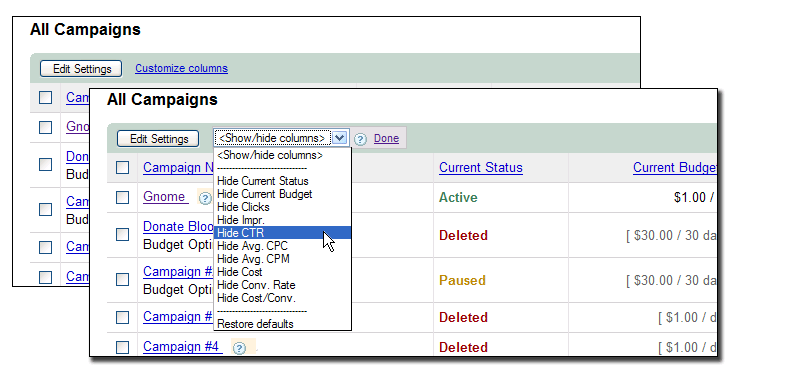
Are there certain statistics in your account that you don't need to see each time you log in? Now, you can use our Customizable Columns feature to choose the columns you'd like to view. Simply select the new 'Customize Columns' link from the Campaign Summary, Campaign Detail, and/or Ad Group Detail page, and indicate which column you'd like to hide. The column selected will immediately stop showing and will remain hidden until you choose to unhide it.

And, if you decide that you'd like to view this column again in the future, simply select the 'Customize Columns' link again and choose to unhide the column. Check it out below:


Posted by Sarah, Inside AdWords crew
Read More
Posted in New features, Tools | No comments

Thursday, 25 January 2007

AdWords Editor now available for Mac

Posted on 16:57 by Unknown
Here's a quick update from Lewis L., a member of the AdWords Editor team:

We're excited to announce that AdWords Editor is now available for Mac users. Just like the Windows version, AdWords Editor for Mac allows you to navigate your AdWords account quickly and easily as well as make bulk changes to keywords and ad text. Mac users running OS X (10.4 or later) can download the application from the AdWords Editor website. For a full list of features, check out the release notes section of the website.

Posted by Judy, Inside AdWords crew
Read More
Posted in Tools | No comments

Wednesday, 24 January 2007

Report Center Series (Part 1)

Posted on 23:03 by Unknown
In a recent Inside AdWords post, Ronnie C. from the Optimization team encouraged you to not only test and iterate, but to also evaluate your account's performance. If you’re using Google Analytics or any other web analytics program, you’re probably already doing this. For those who haven’t gotten around to implementing any sort of tracking, you might consider using a powerful, but sometimes forgotten, tool that lives right in your AdWords account – the Report Center.

To help you begin (or improve) your account performance evaluation process, we thought we’d cover the ins and outs in a series devoted to the Report Center. Part 1 is a basic overview of what you’ll find within the Reports section of your account. And while this post is a bit longer than our usual posts, the subject is very important to advertiser success -- and we think you'll find it worth your time.

(For the best learning experience, you may want to open your AdWords account and follow along as we review the various sections below.)

I. REPORT CENTER PAGE
After logging into your account, select the Reports tab. You’ll be taken to the Report Center page – one of two pages within the Reports tab. On the Report Center page, you’ll find two sections (Last 5 Reports and Saved Templates) and a link to the Create Report page.

Last 5 Reports
Aptly named, the Last 5 Reports section shows you the last 5 reports you ran. This includes both on-demand and scheduled reports. This section comes in handy if you run a report and then decide to leave your AdWords account before the report is finished.

Saved Templates
Below the Last 5 Reports section, you’ll notice Saved Templates. If you find yourself running the same report repeatedly, you might consider saving the report as a template. Templates are also editable in case you need to change the information you need included in the report.

Create a Report Now link
The Create a Report Now link at the top of the Report Center page, takes you to the Create Report page. This is where you’ll select the type of report you want, as well as the type and amount of data you need.

II. CREATE REPORT PAGE
The Create Report page comprises 4 sections: Report Type; Settings; Advanced Settings; and Templates, Scheduling, and Email.

Report Type
The first step in creating a report is selecting the type of report you want to run. You’ll find a wide variety of reports that are all aimed at helping you get precisely the information you need.

For example, say in November you added a slew of holiday ads with varying URLs (to test different landing pages) to your “Holiday” campaign. Now that the holidays are over, you want to know how each URL performed. Which type of report would you run? Though several reports could do the job, the URL Performance report would likely provide you with the most relevant report parameters.

Settings
The Settings section allows you to determine the scope of your report's data. This is where you'll determine the report’s unit of time (e.g. daily or weekly), date range (use the predetermined ranges or set your own date range), and the campaigns and ad groups to be included.

Advanced Settings
Use the Advanced Settings section to fine tune your report. You can add or remove columns of data and also filter your results.

Using the "Holiday" campaign example from above, say you want to know not only how your holiday URLs performed overall, but also how they performed on the search network versus the content network. To break out your report by search versus content data, check the ‘Ad Distribution’ box under Attributes. The resulting report would indicate the URLs’ performance on search and content on separate lines. One thing to note is that not all settings are available for all report types; however, the Create Report page is dynamic and will adjust based on the selections you make.

Templates, Scheduling, and Email
This is where you’ll name your report, decide whether you’d like to save it as a template, schedule it to run automatically (if desired), and choose whether you want it emailed to you after it finishes running. Scheduling reports is a great way to establish a regular performance evaluation process. And, if you work with others on managing your AdWords account, reports can be emailed to multiple recipients.

This concludes part 1 of our Report Center series. Stayed tuned for part 2 in which we'll do a deeper dive into the different types of reports and why they’re used.

Posted by Judy, Inside AdWords crew
Read More
Posted in Reporting and Analytics | No comments

Monday, 22 January 2007

Site exclusion is now unlimited

Posted on 16:25 by Unknown
As we've mentioned in the past, the Site Exclusion tool provides you with more control for your campaigns that are targeting the Google Content Network by allowing you to exclude your ads from showing up on particular sites or sections of sites (such as the sports section of an online newspaper).

Today, we'd like to let you know about a recent change: you can now exclude an unlimited number of sites. We hope you'll use the Site Exclusion tool to improve your ROI and refine your targeting across the network. And, as always, we'd like to remind you that excluding a site (or a section of a site) from one of your campaigns will prevent your ad from showing on all of the pages of that site (or section). Therefore, to ensure you don't miss out on any potential customers, we suggest that you review a site carefully before deciding to exclude it from your campaign.

Posted by Sarah, Inside AdWords crew
Read More
Posted in | No comments

Thursday, 18 January 2007

New Year's resolution for your AdWords account

Posted on 16:11 by Unknown
January is a time for New Year's resolutions. So, why not make a resolution that can improve the effectiveness of your AdWords account? Ronnie C. from our Optimization team shares a three-in-one tip on how to optimize your account: Test, Evaluate, and Iterate.

1. Test - Even a finely tuned account can typically be improved. You may have keywords that are no longer driving quality traffic, ad text that is getting stale, or landing pages on your website that aren't converting. Google AdWords lets you experiment with everything from new keywords to different ad text to different landing pages. If you're not testing, you may be missing out on opportunities to increase your return on investment.

2. Evaluate - As important as testing is, it's also important to measure the impact of your experiments on performance. Trust the results you see and make changes that can help you achieve your goals, whether they are to increase traffic or conversions. Online advertising is trackable and your AdWords account provides a lot of insightful performance information.

3. Iterate - AdWords has many more features than it did five years ago. To achieve the best results on your campaigns, you'll want to do more than just create an account and forget about it. Running a successful account requires time and attention. Once you have evaluated your tests, you may find that it's time to start over and do it again.

This is one resolution you will definitely want to keep! Optimization advice and lessons are available in both multimedia and text formats in the AdWords Learning Center. Good luck and happy optimizing!

Posted by Feng, Inside AdWords crew
Read More
Posted in | No comments

Friday, 12 January 2007

AdWords system maintenance on January 13

Posted on 10:12 by Unknown
Here's a quick heads up from our tech team:

On Saturday, January 13th, the AdWords system will be unavailable from approximately 10 a.m. to 3 p.m. PST due to system maintenance. While you won't be able to log into your accounts during this time, your campaigns will continue to run as usual. We apologize for any inconvenience.

Posted by Sarah, Inside AdWords crew
Read More
Posted in | No comments

Wednesday, 10 January 2007

Our top 10 of 2006

Posted on 21:26 by Unknown
In what's becoming an annual tradition at Inside AdWords, we're taking a few minutes to think about our favorite blog moments of 2006 - and, what better day to reflect on our top 10 than on the tenth day of the new year. So, without further ado (and while you're still on track with all of your new year's resolutions), here's our top 10 of 2006:

10) The ads diagnostic tool is now available within your Ad Group.

9) Ray let us know how he has used AdWords for his business.

8) The new tabbed Ad Group view provides your key statistics in a way that's easy to find and understand.

7) The Seahawks played in the Super Bowl (!) and reminded you to always complement your offline efforts with online advertising.

6) The ad preview tool lets you view your locally targeted ads that are appearing outside of your physical location.

5) Get in person training on AdWords with the new AdWords Seminars.

4) Do you run a local store that closes at 5pm? Make sure your ads don't show when you're closed with ad scheduling.

3) Get your ad on the map with local business ads and choose to add custom icons.

2) Manage your AdWords account from your desktop with AdWords Editor.

1) Engage your audience with click-to-play video ads.

With that, we'd like to thank you all for a great year here at Inside AdWords - we look forward to providing you with more insight and updates on AdWords in the year to come.

Posted by Sarah, Inside AdWords crew
Read More
Posted in | No comments

Monday, 8 January 2007

AdWords maintenance on January 9

Posted on 17:59 by Unknown
This just in from our tech team:
We will be performing AdWords maintenance from 8 a.m. to 8 p.m. PST tomorrow – Tuesday, January 9, 2007. While all AdWords advertisements will continue to run as normal and you will be able to log into your account, you may not be able to run or retrieve reports, or upload image or video ads during this time.

We apologize for the short notice and any inconvenience this may cause you.

Posted by Judy, Inside AdWords crew
Read More
Posted in | No comments

Kick start 2007 with AdWords learning

Posted on 17:31 by Unknown
As another year begins, perhaps you've made a resolution to polish up your AdWords skills. Here at Inside AdWords, we've put together three ways to learn more about getting the most out of AdWords:
  1. Attend an AdWords Seminar -- new dates added!

    AdWords Seminars are day-long, in-person training sessions offered by search marketing professionals who are also Qualified Invididuals in the Google Advertising Professionals program. This program received great response from attendees in 2006, so we're kicking off the New Year with seminars in Charlotte, Scottsdale (Phoenix area), San Diego, and the Washington, D.C. area. You'll find more information about these seminars, including dates, course outlines, and registration instructions at http://www.google.com/awseminars. And of course, if you'd like to be informed when AdWords Seminars become available in your area, simply fill out this form.

  2. Review lessons in the AdWords Learning Center

    The AdWords Learning Center is a wonderful resource for those who want to learn about AdWords in a lesson format. Available in multimedia or text-only formats, the AdWords Learning Center covers everything from beginner topics such as how to set up your AdWords account, to more advanced features such as the AdWords Editor. You'll find the AdWords Learning Center here at: http://www.google.com/adwords/learningcenter/.

  3. Participate in the AdWords Help forum

    AdWords Help is an online forum designed for advertisers to search or browse for answers, ask questions, and assist others with AdWords -- 24/7. You'll find the forum divided into different categories such as "AdWords Basics" or "Return on Investment" to better guide your discussions and questions. Check out the forum here and perhaps you have a tip or two to share with your fellow advertisers.
We hope you'll take advantage of some or all of these learning resources to help you get your AdWords account off to a great start in 2007!

Posted by Vivian, Inside AdWords crew
Read More
Posted in | No comments
Newer Posts Older Posts Home
Subscribe to: Comments (Atom)

Popular Posts

  • Put Your Business on the Map
    A bunch of you have been signing up to use local targeting for your ads , which helps you drive traffic based on region and language. To he...
  • Roses are red...
    For Valentine's Day, we wanted to write you a sonnet but we've found that it isn't as easy as Shakespeare made it look. So inst...
  • AdWords system maintenance on July 14
    On Saturday, July 14th, the AdWords system will be unavailable from approximately 10 a.m. to 2 p.m. PDT due to our regularly scheduled syst...
  • Well, the "send us an email" link seems to be working!
    We've gotten a few emails asking for a clarification of our previous post, and we're happy to oblige: Please rest assured that your ...
  • Daylight Saving Time - a friendly reminder
    The Inside AdWords crew would like to remind you that Daylight Saving Time begins a few weeks early this year. The time change will take ef...
  • AdWords system maintenance on February 16th
    On Saturday, February 16th, the AdWords system will be unavailable from approximately 10 a.m. to 2 p.m. PST due to scheduled maintenance. W...
  • Audio Ads Webinars: sign up now
    Later this month, specialists from the Audio Ads team will host three free online webinars. Join us for tips on how to set up an effective r...
  • Target with even more precision
    As we've mentioned, site targeting allows you to hand pick sites from our content network where you'd like to show your ads. Now, w...
  • Google Print Ads now available to AdWords advertisers
    We're very excited to announce the availability of Google Print Ads ™ in U.S. AdWords accounts. To introduce you to Google Print Ads, ...
  • An update to display URL policy
    We'd like to give you advance notice of an update to our display URL policy, which will take effect on April 1st. While the majority of ...

Categories

  • Ads quality
  • Announcements
  • Blog updates
  • Case studies
  • Fun
  • Invalid clicks
  • Learning resources
  • New features
  • Optimization
  • Related products
  • Reporting and Analytics
  • Seasonal
  • Series
  • System updates
  • Testing opportunities
  • Tips
  • Tools

Blog Archive

  • ►  2008 (18)
    • ►  February (8)
    • ►  January (10)
  • ▼  2007 (151)
    • ►  December (9)
    • ►  November (14)
    • ►  October (11)
    • ►  September (14)
    • ►  August (15)
    • ►  July (13)
    • ►  June (9)
    • ►  May (12)
    • ►  April (15)
    • ►  March (14)
    • ►  February (16)
    • ▼  January (9)
      • Customize the columns in your account
      • AdWords Editor now available for Mac
      • Report Center Series (Part 1)
      • Site exclusion is now unlimited
      • New Year's resolution for your AdWords account
      • AdWords system maintenance on January 13
      • Our top 10 of 2006
      • AdWords maintenance on January 9
      • Kick start 2007 with AdWords learning
  • ►  2006 (155)
    • ►  December (10)
    • ►  November (11)
    • ►  October (14)
    • ►  September (10)
    • ►  August (13)
    • ►  July (11)
    • ►  June (12)
    • ►  May (14)
    • ►  April (15)
    • ►  March (18)
    • ►  February (15)
    • ►  January (12)
  • ►  2005 (111)
    • ►  December (12)
    • ►  November (11)
    • ►  October (15)
    • ►  September (13)
    • ►  August (15)
    • ►  July (19)
    • ►  June (15)
    • ►  May (11)
Powered by Blogger.

About Me

Unknown
View my complete profile